
Agentic AI in SAP: What It Means for Your Sales Team

Senior SAP BAIP Architect, Spadoom AG
An AI agent, in SAP’s sense, is software that notices a stalled process and takes the next step on its own: it drafts the quote from a customer’s email, classifies the incoming case, flags the opportunity that has gone quiet. SAP announced 14 new Joule Agents at SAP Connect in October 2025, and Gartner expects 40% of enterprise applications to include task-specific agents like these by the end of 2026, up from less than 5% in 2025. Our Joule navigator shows which Joule assistants are available and which SAP has only announced.
I take forecasts of that kind with a pinch of salt. What I care about is more modest: which of these agents can a sales team switch on in a Sales Cloud V2 tenant today, and what has to be true about the data first? That is what this post covers.
TL;DR: Agentic AI works towards a goal and carries out several steps itself, where an assistant like Joule only answers and suggests. In SAP Sales Cloud V2, agents arrive through the CX AI Toolkit (for example quote creation from email) and need their own licence. Fully autonomous deal handling is not on offer. Clean your data, map one process, pilot one agent, and keep a person in the loop for anything the customer sees.
What makes AI “agentic”?
Most AI in business software today is reactive. You ask Joule a question and get an answer; a generative model drafts an email. You still decide what happens next and you still click the buttons.
An agent is different because it acts. It is given a goal rather than a single prompt, breaks it into steps, uses systems and tools to carry them out, and adjusts when something does not go to plan. Generative AI drafts the email; an agent sends it, watches for the reply and schedules the follow-up.
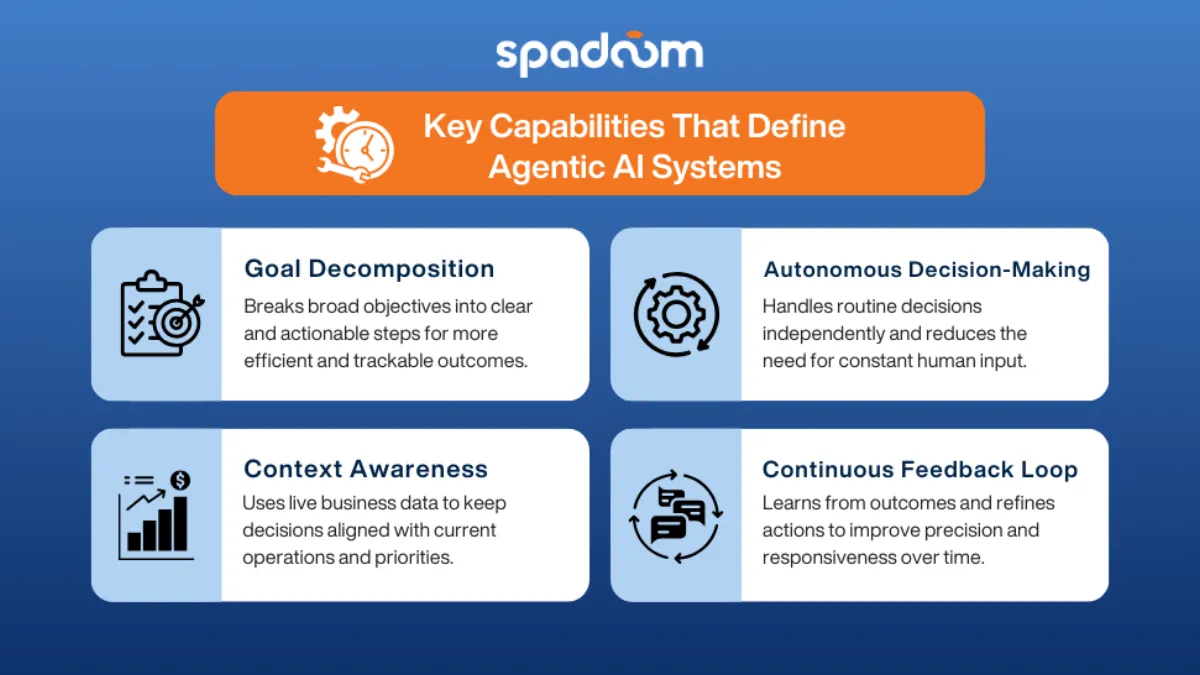
Four capabilities separate agents from classic automation:
- Goal decomposition. The agent turns an objective (“prepare a quote for this request”) into steps it can track.
- Decisions within limits. It decides routine questions on its own, such as which product a request refers to, inside boundaries you set.
- Context awareness. It reads the current state of the business: stock, customer priority, open cases.
- Feedback. It evaluates outcomes and hands uncertain cases to a person instead of guessing.
Rule-based automation still has its place. If a process never changes, a workflow rule is cheaper and easier to audit than an agent.
Where does SAP deliver agents today?
SAP delivers its agents as Joule Agents, embedded in the applications and built on SAP BTP. The first wave concentrated on finance, procurement, HR and supply chain. For customer experience, SAP’s own material names these examples:
- Quote Creation Agent in Sales Cloud V2, which turns a customer’s email request into a quote, according to SAP’s learning course on the CX AI Toolkit. The same course lists a case classification agent and a Q&A agent.
- Digital Service Agent in Service Cloud V2, generally available since the Q4 2025 CX release, which answers routine customer questions and hands over to a person when needed. We describe it in detail in our post on the Digital Service Agent.
- Joule Studio agent builder, generally available in the same release, for building your own agents on SAP’s agent runtime.
Two practical points. The CX agents come with the SAP CX AI Toolkit, which SAP licenses separately from Sales Cloud V2. And availability depends on edition, data centre and release, so check SAP’s current release notes or the SAP Roadmap Explorer before you plan around a specific agent.
What’s real in Sales Cloud V2 today, and what is still roadmap?
There is a gap between what is announced on stage and what works in your tenant. This is how we see it in September 2026.
Working today, with Joule: opportunity summaries, natural-language queries on the pipeline, email drafts from notes and context, next-step suggestions based on deal stage. These are assistant features rather than agents, but they are where most of the value currently comes from. Our hands-on guide to Joule in Sales Cloud V2 covers them.
Available, but needs configuration and a licence: agents from the CX AI Toolkit such as quote creation from email, AI-assisted lead scoring combined with routing rules, and pulling service data into the sales context. These work when the data is clean, the rules are defined and the integration on SAP BTP is in place. Many companies do not have that wiring yet.
Still roadmap or not on offer: agents that move deals through stages without human confirmation, and chains of several agents coordinating across sales, service and ERP. We see no dates for these that we could verify, so treat them as direction, not plan.
That is not a criticism of SAP. Enterprise software earns trust one controlled step at a time, and a sales process touches customers, prices and contracts.
What should you check before deploying an agent?
Data readiness. An agent decides based on what it sees. If lead records are half empty or opportunity stages mean different things to different reps, the agent does the wrong thing faster. Fix the basics first.
Process visibility. Map the process before you automate it: the steps, the decision points, the exceptions, who owns what. If you cannot draw it on a whiteboard, an agent cannot run it.
Governance. Define what the agent may do on its own, what needs approval, and how its decisions are logged. In regulated industries this is not optional. Ask for the audit trail from day one.
People. Position agents as colleagues who take over the admin work, not as replacements. Reps who understand what the agent does and where it stops are the ones who use it.
The ERP seam. Many sales agents need data they do not own: prices, availability, order status. If Sales Cloud V2 and S/4HANA are not properly connected, the agent stops at exactly the point where it would be useful. This is why we deliver S/4HANA Public Cloud and Sales Cloud V2 as one integrated stack with one team.
What should your sales team focus on now?
Start with data quality. It is the least exciting advice and the most important. Every AI feature, agentic or not, is only as good as the records it works with.
Turn on what already works. Joule’s summaries and queries save reps time on routine lookups every day. Across a larger team that adds up.
Pilot one agent. Pick a structured, frequent task: quote creation from email requests, or lead qualification for one segment. Define what success looks like, run it for 90 days and measure. That gives you your own data instead of vendor slides. If you want to see what an agent can do against a real tenant before licensing anything, our MCP Server for SAP Sales & Service Cloud V2 exposes V2 APIs as tools for any MCP-compatible AI; we use it to prototype agentic workflows. The same pattern applies in commerce, as we describe in our post on SAP Commerce Cloud and MCP.
Do not reorganise around the roadmap. Plan your sales organisation around what works today and adjust when capabilities mature. Companies that start now with clean data and one pilot will be ready when the broader agent features arrive; those that wait for the complete vision will start from scratch.
We help sales teams introduce AI in SAP Sales Cloud V2, starting with what works today, and connect it to the ERP data agents depend on. More on SAP’s AI portfolio is on our SAP Business AI page. Talk to us about your AI plans.
Frequently Asked Questions
What is the difference between agentic AI, an AI assistant and ordinary automation?
Automation follows fixed rules: if X happens, do Y. An assistant such as Joule answers when you ask and suggests the next step. An agent is given a goal, plans the steps, uses tools and systems to carry them out and adapts to what it finds, within boundaries you define. In SAP, agents are delivered as Joule Agents.
Do I need a separate licence for AI agents in Sales Cloud V2?
Usually, yes. According to SAP’s learning material, the AI agents in Sales Cloud V2 come with the SAP CX AI Toolkit, which needs its own licence on top of Sales Cloud V2, and Joule itself has dedicated SKUs. Premium AI consumption is billed in SAP AI Units. Check your contract with your SAP account manager.
Which SAP agents can a sales team use today?
Examples that SAP documents for customer experience include the Quote Creation Agent, which turns an email request into a quote, AI-assisted pipeline views, and on the service side the Digital Service Agent and case classification. SAP also offers a Tender Analysis Agent for RFQ documents. Availability depends on edition, region and licence, so check the current release notes.
What data quality do we need before switching on agents?
At minimum: opportunity stages with the same names and definitions across teams, complete account and contact records (our rule of thumb is company name, phone and email on at least 80% of records) and regular activity logging. Agents act on what they see, so inconsistent data leads to wrong actions, not just wrong reports.
Can agentic AI close deals without human involvement?
No, and that is not the goal. SAP’s CX agents propose or prepare actions such as a draft quote, and a person confirms anything that affects the customer or the deal. The value lies in removing the admin work between selling activities, so reps spend more time with customers.
Is agentic AI ready for production?
For structured tasks with clear outcomes, yes: classifying cases, drafting quotes from requests, routing and enriching records. Open-ended tasks that need judgement are still maturing. SAP’s Joule Studio agent builder, generally available since the Q4 2025 release, makes custom agents possible, but data quality and governance decide whether they work.
Ask Spadoom
Answers drawn from what Spadoom has published on this site, with links to the pages they come from.
Try one of these
AI-generated answers. Verify before acting. Questions are stored anonymously, without your IP address, so we can improve our content. Please do not enter personal data.
SAP Sales Cloud V2 implementation partner
Spadoom is the SAP Sales Cloud V2 implementation partner across Switzerland, Germany, Austria and Italy. 14-week median go-live. Live customers across DACH.
Related Articles

SAP Joule for Sales Cloud V2: A Hands-On Guide
What Joule does in SAP Sales Cloud V2 today, how it is licensed and switched on, how it differs from Joule Agents and Microsoft Copilot, and where it still falls short.

Connecting SAP Sales Cloud V2 with Business Data Cloud: Integration Patterns That Work
How Sales Cloud V2 data gets into SAP Business Data Cloud, which integration patterns hold up, how to join CRM and ERP data for pipeline-to-cash, and where teams still get it wrong.

SAP CX AI Toolkit: What's Available, What's Announced, What's Still Roadmap
Which AI features in SAP Sales Cloud V2, Service Cloud V2, SAP Engagement Cloud, Commerce and CDP run in production today, which SAP has announced with a date, and how to roll them out and measure the return.